C# Mailpit
last modified October 18, 2026
In this article we show how to test emails sent from C# applications with Mailpit and its REST API.
Mailpit
Mailpit is a free, open source email testing tool. It runs an SMTP server that accepts all messages but never delivers them; instead, it stores them and displays them in a web interface. Applications under development can send real emails without the risk of reaching real customers.
Besides the web interface, Mailpit has a REST API. With it, we can list, search, read, and delete the caught messages from code, which makes it possible to verify emails in automated tests. Mailpit can also check the links and the HTML compatibility of a message, and it can simulate SMTP errors.
In the send mail article, we use Mailpit as a test server for sending emails. Here we focus on the other side: checking what the application actually sent.
Running Mailpit
The easiest way to run Mailpit is in a Docker container.
$ docker run -d --name mailpit -p 8025:8025 -p 1025:1025 axllent/mailpit \
    --smtp-auth-accept-any --smtp-auth-allow-insecure --enable-chaos
Mailpit listens for SMTP connections on port 1025; the web interface and the REST API are available on port 8025.
--smtp-auth-accept-any– accept any username and password, so that we can test code that authenticates--smtp-auth-allow-insecure– allow authentication over an unencrypted connection--enable-chaos– enable the simulation of SMTP errors, which we use later in the article
By default, the messages are stored in a temporary database and are lost when
Mailpit stops; with the --database option, we can specify a file
for persistent storage. The examples were tested with Mailpit 1.31.
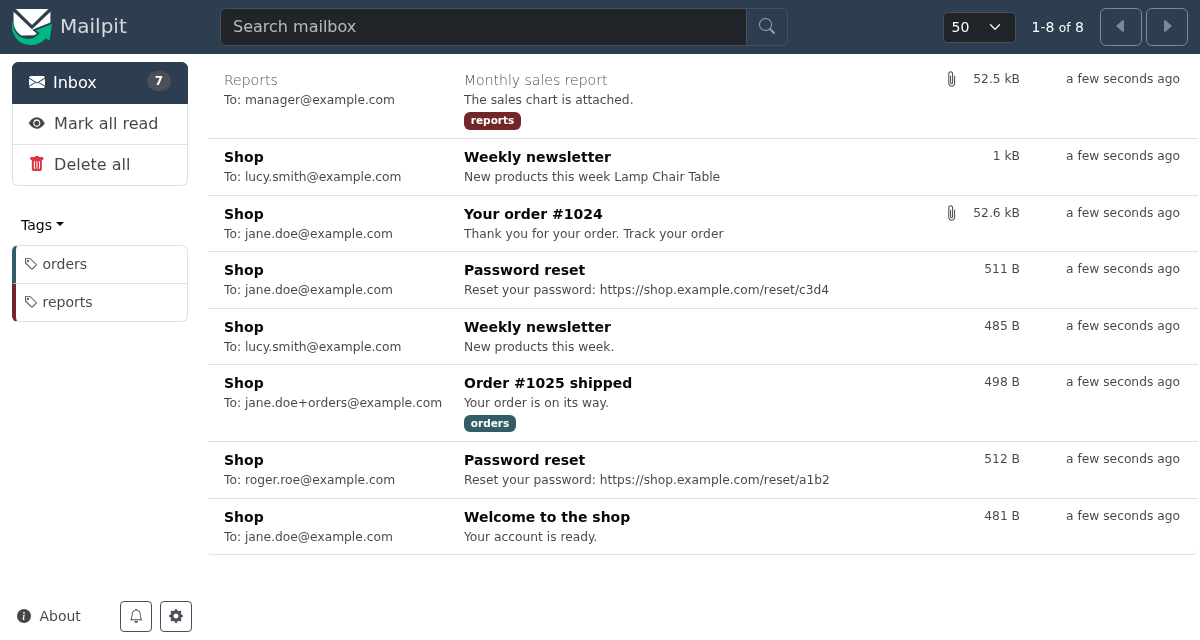
Sending a test email
First, we send a message that we inspect in the next examples. We use the MailKit library.
$ dotnet new console -n MailpitDemo
$ cd MailpitDemo
$ dotnet add package MailKit
We create a console project and add MailKit. The rest of the examples use only
HttpClient and System.Text.Json from the standard
library.
using MailKit.Net.Smtp;
using MailKit.Security;
using MimeKit;

var message = new MimeMessage();

message.From.Add(new MailboxAddress("Shop", "noreply@shop.example.com"));
message.To.Add(new MailboxAddress("Jane Doe", "jane.doe@example.com"));
message.Subject = "Your order #1024";

var builder = new BodyBuilder
{
    TextBody = "Thank you for your order.\nTrack it at https://example.com/orders/1024",
    HtmlBody = """
        <p>Thank you for your <b>order</b>.</p>
        <p><a href="https://example.com/orders/1024">Track your order</a></p>
        """
};

await builder.Attachments.AddAsync("chart.png");
message.Body = builder.ToMessageBody();

using var client = new SmtpClient();

await client.ConnectAsync("localhost", 1025, SecureSocketOptions.None);
await client.SendAsync(message);
await client.DisconnectAsync(true);

Console.WriteLine("Email sent");
The program sends an order confirmation with a plain text body, an HTML body, and a PNG image as an attachment. MailKit is covered in more detail in the send mail article.
$ dotnet run
Email sent
Application information
The /api/v1/info endpoint returns information about the running
Mailpit instance.
using System.Net.Http.Json;

using var client = new HttpClient { BaseAddress = new Uri("http://localhost:8025/") };

var info = await client.GetFromJsonAsync<AppInfo>("api/v1/info");

Console.WriteLine($"Mailpit {info!.Version}");
Console.WriteLine($"Messages: {info.Messages}, unread: {info.Unread}");
Console.WriteLine($"Accepted by SMTP: {info.RuntimeStats.SmtpAccepted}");

record AppInfo(string Version, int Messages, int Unread, RuntimeStats RuntimeStats);
record RuntimeStats(long Uptime, int SmtpAccepted, int SmtpRejected);
We print the version, the number of stored messages, and the number of messages accepted by the SMTP server.
using var client = new HttpClient { BaseAddress = new Uri("http://localhost:8025/") };
We set the base address of the client, so that we can use relative URLs in the requests.
var info = await client.GetFromJsonAsync<AppInfo>("api/v1/info");
The GetFromJsonAsync extension method sends a GET request and
deserializes the JSON response. It uses the web defaults of
System.Text.Json, which match property names case-insensitively;
the SMTPAccepted field of the JSON is mapped to the
SmtpAccepted property.
record AppInfo(string Version, int Messages, int Unread, RuntimeStats RuntimeStats);
We define records only for the fields we need; the other fields of the response are ignored.
$ dotnet run
Mailpit v1.31.6
Messages: 1, unread: 1
Accepted by SMTP: 1
Listing messages
The /api/v1/messages endpoint returns a list of message summaries,
newest first.
using System.Net.Http.Json;

using var client = new HttpClient { BaseAddress = new Uri("http://localhost:8025/") };

var res = await client.GetFromJsonAsync<MessagesResponse>("api/v1/messages?limit=10");

Console.WriteLine($"Total: {res!.Total}, unread: {res.Unread}");

foreach (var m in res.Messages)
{
    string to = string.Join(", ", m.To.Select(a => a.Address));
    Console.WriteLine($"{m.Created:yyyy-MM-dd HH:mm:ss} {m.From.Address} -> {to}");
    Console.WriteLine($"  {m.Subject} ({m.Size} B, attachments: {m.Attachments})");
}

record MessagesResponse(int Total, int Unread, int Start, List<MessageSummary> Messages);
record MessageSummary(string ID, Mailbox From, List<Mailbox> To, string Subject,
    DateTime Created, int Size, int Attachments, bool Read);
record Mailbox(string Name, string Address);
The program prints the date, the sender, the recipients, and the subject of each message.
var res = await client.GetFromJsonAsync<MessagesResponse>("api/v1/messages?limit=10");
The list is paged; the start and limit query
parameters select the page. The default limit is 50.
record Mailbox(string Name, string Address);
An email address consists of an optional display name and the address itself.
We cannot name the record Address, because a member of a type
cannot have the same name as the type.
$ dotnet run
Total: 1, unread: 1
2026-10-18 07:59:55 noreply@shop.example.com -> jane.doe@example.com
  Your order #1024 (53865 B, attachments: 1)
The Created time is the time when Mailpit received the message;
it is in UTC.
Message details
The /api/v1/message/{ID} endpoint returns the whole message,
including the bodies and the list of attachments.
using System.Net.Http.Json;

using var client = new HttpClient { BaseAddress = new Uri("http://localhost:8025/") };

var msg = await client.GetFromJsonAsync<Message>("api/v1/message/latest");

Console.WriteLine($"Subject: {msg!.Subject}");
Console.WriteLine($"From: {msg.From.Name} <{msg.From.Address}>");
Console.WriteLine($"To: {string.Join(", ", msg.To.Select(a => a.Address))}");
Console.WriteLine($"Date: {msg.Date:yyyy-MM-dd HH:mm:ss zzz}");

Console.WriteLine("--- text ---");
Console.WriteLine(msg.Text);
Console.WriteLine("--- html ---");
Console.WriteLine(msg.HTML);

foreach (var att in msg.Attachments)
{
    Console.WriteLine($"Attachment: {att.FileName} ({att.ContentType}, {att.Size} B, part {att.PartID})");
}

record Message(string ID, Mailbox From, List<Mailbox> To, string Subject,
    DateTimeOffset Date, string Text, string HTML, List<Attachment> Attachments);
record Mailbox(string Name, string Address);
record Attachment(string PartID, string FileName, string ContentType, int Size);
We print the details of the newest message.
var msg = await client.GetFromJsonAsync<Message>("api/v1/message/latest");
Instead of a message ID, we can use the special value latest.
Note that reading a message through this endpoint marks it as read, just like
opening it in the web interface.
$ dotnet run
Subject: Your order #1024
From: Shop <noreply@shop.example.com>
To: jane.doe@example.com
Date: 2026-10-18 09:59:55 +02:00
--- text ---
Thank you for your order.
Track it at https://example.com/orders/1024
--- html ---
<p>Thank you for your <b>order</b>.</p>
<p><a href="https://example.com/orders/1024">Track your order</a></p>
Attachment: chart.png (image/png, 38514 B, part 2)
Headers and raw source
The /headers endpoint returns all message headers; the
/raw endpoint returns the complete source of the message.
using System.Net.Http.Json;

using var client = new HttpClient { BaseAddress = new Uri("http://localhost:8025/") };

var headers = await client.GetFromJsonAsync<Dictionary<string, string[]>>(
    "api/v1/message/latest/headers");

foreach (var name in new[] { "Subject", "Content-Type", "Mime-Version", "Return-Path" })
{
    Console.WriteLine($"{name}: {string.Join("; ", headers![name])}");
}

Console.WriteLine();

string raw = await client.GetStringAsync("api/v1/message/latest/raw");

foreach (var line in raw.Split("\r\n").Where(l => l.StartsWith("Content-Type")))
{
    Console.WriteLine(line);
}
We print some headers and then the content types of all MIME parts found in the raw source.
var headers = await client.GetFromJsonAsync<Dictionary<string, string[]>>(
    "api/v1/message/latest/headers");
The headers are returned as a JSON object; each header has an array of values, because a header may occur several times in a message.
$ dotnet run
Subject: Your order #1024
Content-Type: multipart/mixed; boundary="=-3PeQNGQh9fqcb5NUpyNvJA=="
Mime-Version: 1.0
Return-Path: <noreply@shop.example.com>

Content-Type: multipart/mixed; boundary="=-3PeQNGQh9fqcb5NUpyNvJA=="
Content-Type: multipart/alternative; boundary="=-GZKw0HlVKSAFuoDrlRQasw=="
Content-Type: text/plain; charset=utf-8
Content-Type: text/html; charset=utf-8
Content-Type: image/png; name=chart.png
The output shows the structure of the message: a multipart/mixed
part contains a multipart/alternative part with the text and HTML
bodies, followed by the attachment.
Downloading attachments
Attachments are downloaded from the /part/{PartID} endpoint.
using System.Net.Http.Json;
using System.Security.Cryptography;

using var client = new HttpClient { BaseAddress = new Uri("http://localhost:8025/") };

var msg = await client.GetFromJsonAsync<Message>("api/v1/message/latest");

Directory.CreateDirectory("downloads");

foreach (var att in msg!.Attachments)
{
    byte[] data = await client.GetByteArrayAsync($"api/v1/message/{msg.ID}/part/{att.PartID}");
    string hash = Convert.ToHexStringLower(SHA256.HashData(data));

    Console.WriteLine($"{att.FileName}: {data.Length} bytes");
    Console.WriteLine($"SHA-256: {hash}");
    Console.WriteLine($"Matches Mailpit checksum: {hash == att.Checksums.SHA256}");

    await File.WriteAllBytesAsync(Path.Combine("downloads", att.FileName), data);
}

record Message(string ID, List<Attachment> Attachments);
record Attachment(string PartID, string FileName, string ContentType, int Size,
    Checksums Checksums);
record Checksums(string MD5, string SHA1, string SHA256);
We download all attachments of the newest message and verify their content.
byte[] data = await client.GetByteArrayAsync($"api/v1/message/{msg.ID}/part/{att.PartID}");
string hash = Convert.ToHexStringLower(SHA256.HashData(data));
We download the attachment and compute its SHA-256 hash.
Console.WriteLine($"Matches Mailpit checksum: {hash == att.Checksums.SHA256}");
Mailpit computes MD5, SHA-1, and SHA-256 checksums of each attachment. In a test, we can compare them with the checksum of the original file without downloading the attachment.
$ dotnet run
chart.png: 38514 bytes
SHA-256: 95588433ec0044aa69904c8f81e97b33dfabc6bd518abb8be149859f2115d8ca
Matches Mailpit checksum: True
The downloaded image is identical to the sent file. Text attachments may
differ, though: MimeKit converts the line endings of text/*
attachments to CRLF, as required by the email standards, so a file with Unix
line endings arrives a few bytes larger.
Searching messages
The /api/v1/search endpoint finds messages with a query language
similar to the one used by Gmail. First, we send several messages.
using MailKit.Net.Smtp;
using MailKit.Security;
using MimeKit;

(string To, string Subject, string Body)[] mails =
[
    ("jane.doe@example.com", "Welcome to the shop", "Your account is ready."),
    ("roger.roe@example.com", "Password reset", "Reset your password: https://shop.example.com/reset/a1b2"),
    ("jane.doe+orders@example.com", "Order #1025 shipped", "Your order is on its way."),
    ("lucy.smith@example.com", "Weekly newsletter", "New products this week."),
    ("jane.doe@example.com", "Password reset", "Reset your password: https://shop.example.com/reset/c3d4")
];

using var client = new SmtpClient();
await client.ConnectAsync("localhost", 1025, SecureSocketOptions.None);

foreach (var (to, subject, body) in mails)
{
    var message = new MimeMessage();
    message.From.Add(new MailboxAddress("Shop", "noreply@shop.example.com"));
    message.To.Add(MailboxAddress.Parse(to));
    message.Subject = subject;
    message.Body = new TextPart("plain") { Text = body };

    await client.SendAsync(message);
}

await client.DisconnectAsync(true);

Console.WriteLine($"Sent {mails.Length} emails");
The program sends five messages to different recipients over one SMTP connection.
using System.Net.Http.Json;

using var client = new HttpClient { BaseAddress = new Uri("http://localhost:8025/") };

string[] queries =
[
    "subject:\"password reset\"",
    "to:jane.doe@example.com",
    "to:jane.doe@example.com subject:\"password reset\"",
    "has:attachment",
    "tag:orders",
    "reset -to:roger.roe@example.com"
];

foreach (var query in queries)
{
    string url = $"api/v1/search?query={Uri.EscapeDataString(query)}";
    var res = await client.GetFromJsonAsync<SearchResponse>(url);

    Console.WriteLine($"{query} ({res!.MessagesCount} found)");

    foreach (var m in res.Messages)
    {
        Console.WriteLine($"  {m.To[0].Address}: {m.Subject}");
    }
}

record SearchResponse(
    [property: System.Text.Json.Serialization.JsonPropertyName("messages_count")] int MessagesCount,
    List<MessageSummary> Messages);
record MessageSummary(string ID, List<Mailbox> To, string Subject);
record Mailbox(string Name, string Address);
We run several search queries.
subject:"password reset"– the subject contains the phraseto:jane.doe@example.com– filter by recipient; there are alsofrom:,cc:, andbcc:- several conditions are combined with AND
has:attachment– messages with attachmentstag:orders– messages with the given tagreset -to:roger.roe@example.com– a plain word searches the whole message; the minus sign negates a condition
string url = $"api/v1/search?query={Uri.EscapeDataString(query)}";
The query contains spaces, quotes, and other special characters, so we must
escape it with Uri.EscapeDataString.
record SearchResponse(
    [property: System.Text.Json.Serialization.JsonPropertyName("messages_count")] int MessagesCount,
    List<MessageSummary> Messages);
The messages_count field contains the number of matching
messages. Its name uses snake case, so we map it with the
JsonPropertyName attribute.
$ dotnet run
subject:"password reset" (2 found)
  jane.doe@example.com: Password reset
  roger.roe@example.com: Password reset
to:jane.doe@example.com (3 found)
  jane.doe@example.com: Password reset
  jane.doe@example.com: Welcome to the shop
  jane.doe@example.com: Your order #1024
to:jane.doe@example.com subject:"password reset" (1 found)
  jane.doe@example.com: Password reset
has:attachment (1 found)
  jane.doe@example.com: Your order #1024
tag:orders (1 found)
  jane.doe+orders@example.com: Order #1025 shipped
reset -to:roger.roe@example.com (1 found)
  jane.doe@example.com: Password reset
Note that jane.doe+orders@example.com does not match
to:jane.doe@example.com. Mailpit automatically tags messages sent
to such plus addresses with the part after the plus sign; this is how
the message got the orders tag. Plus addresses are a handy way to
separate the emails of individual tests.
Managing messages
The API can also tag messages, change their read status, and delete them.
using System.Net.Http.Json;
using System.Text.Json.Serialization;

using var client = new HttpClient { BaseAddress = new Uri("http://localhost:8025/") };

var resets = await client.GetFromJsonAsync<SearchResponse>(
    $"api/v1/search?query={Uri.EscapeDataString("subject:\"password reset\"")}");

var ids = resets!.Messages.Select(m => m.ID).ToArray();

if (ids.Length == 0)
{
    Console.WriteLine("No password reset messages");
    return;
}

var res = await client.PutAsJsonAsync("api/v1/tags", new { IDs = ids, Tags = new[] { "security" } });
res.EnsureSuccessStatusCode();

res = await client.PutAsJsonAsync("api/v1/messages", new { IDs = ids, Read = true });
res.EnsureSuccessStatusCode();

res = await client.DeleteAsync($"api/v1/search?query={Uri.EscapeDataString("subject:newsletter")}");
res.EnsureSuccessStatusCode();

var tags = await client.GetFromJsonAsync<string[]>("api/v1/tags");
Console.WriteLine($"Tags: {string.Join(", ", tags!)}");

var info = await client.GetFromJsonAsync<AppInfo>("api/v1/info");
Console.WriteLine($"Messages: {info!.Messages}, unread: {info.Unread}");

foreach (var (tag, count) in info.Tags)
{
    Console.WriteLine($"  {tag}: {count}");
}

record SearchResponse(
    [property: JsonPropertyName("messages_count")] int MessagesCount,
    List<MessageSummary> Messages);
record MessageSummary(string ID, string Subject);
record AppInfo(int Messages, int Unread, Dictionary<string, int> Tags);
We tag the password reset messages and mark them as read, and we delete the newsletter.
if (ids.Length == 0)
{
    Console.WriteLine("No password reset messages");
    return;
}
This check is important. The endpoints for setting the read status and for deleting messages apply to all messages when the list of IDs is empty.
var res = await client.PutAsJsonAsync("api/v1/tags", new { IDs = ids, Tags = new[] { "security" } });
For simple request bodies, we use anonymous types. The
PutAsJsonAsync method serializes the object to JSON and sends a
PUT request. Setting tags replaces the existing tags of the messages.
res = await client.DeleteAsync($"api/v1/search?query={Uri.EscapeDataString("subject:newsletter")}");
A DELETE request to the search endpoint deletes all messages that match the query.
$ dotnet run
Tags: orders, security
Messages: 5, unread: 2
  orders: 1
  security: 2
Testing emails with NUnit
The main use of the API is in automated tests. The test sends an email through the application code, waits until the message arrives in Mailpit, and checks its content.
$ dotnet new nunit -o Shop.Tests
$ cd Shop.Tests
$ dotnet add package MailKit
We create an NUnit test project. In a real solution, the tested class would be in a separate project; here we keep everything in one project for brevity.
using MailKit.Net.Smtp;
using MailKit.Security;
using MimeKit;

namespace Shop.Tests;

public class OrderMailer(string host, int port)
{
    public async Task SendConfirmationAsync(string customerEmail, int orderId)
    {
        var message = new MimeMessage();
        message.From.Add(new MailboxAddress("Shop", "noreply@shop.example.com"));
        message.To.Add(MailboxAddress.Parse(customerEmail));
        message.Subject = $"Your order #{orderId}";

        var link = $"https://shop.example.com/orders/{orderId}";

        message.Body = new BodyBuilder
        {
            TextBody = $"Thank you for your order. Track it at {link}",
            HtmlBody = $"""<p>Thank you for your order.</p><p><a href="{link}">Track your order</a></p>"""
        }.ToMessageBody();

        using var client = new SmtpClient();

        await client.ConnectAsync(host, port, SecureSocketOptions.None);
        await client.SendAsync(message);
        await client.DisconnectAsync(true);
    }
}
This is the class under test. It sends an order confirmation with a link to the order. The SMTP host and port are passed to the constructor; in the tests, they point to Mailpit.
using System.Net.Http.Json;
using System.Text.Json.Serialization;

namespace Shop.Tests;

public record Mailbox(string Name, string Address);
public record MessageSummary(string ID, Mailbox From, List<Mailbox> To, string Subject);
public record SearchResponse(
    [property: JsonPropertyName("messages_count")] int MessagesCount,
    List<MessageSummary> Messages);
public record Message(string ID, Mailbox From, List<Mailbox> To, string Subject,
    string Text, string HTML);

public class MailpitClient(string baseUrl) : IDisposable
{
    private readonly HttpClient http = new() { BaseAddress = new Uri(baseUrl) };

    public async Task DeleteAllAsync()
    {
        var res = await http.DeleteAsync("api/v1/messages");
        res.EnsureSuccessStatusCode();
    }

    public async Task<List<MessageSummary>> SearchAsync(string query)
    {
        var url = $"api/v1/search?query={Uri.EscapeDataString(query)}";
        var res = await http.GetFromJsonAsync<SearchResponse>(url);

        return res!.Messages;
    }

    public async Task<Message> GetMessageAsync(string id) =>
        (await http.GetFromJsonAsync<Message>($"api/v1/message/{id}"))!;

    public async Task<Message> WaitForMessageAsync(string query, TimeSpan timeout)
    {
        using var cts = new CancellationTokenSource(timeout);

        while (true)
        {
            var found = await SearchAsync(query);

            if (found.Count > 0)
            {
                return await GetMessageAsync(found[0].ID);
            }

            try
            {
                await Task.Delay(100, cts.Token);
            }
            catch (OperationCanceledException)
            {
                throw new TimeoutException($"No message matching '{query}' within {timeout}");
            }
        }
    }

    public void Dispose() => http.Dispose();
}
The MailpitClient class wraps the API calls used by the tests.
public async Task<Message> WaitForMessageAsync(string query, TimeSpan timeout)
Email delivery is asynchronous. In a real application, the email may be sent by a background job some time after the tested action. Instead of checking the mailbox once, we poll it every 100 ms until a matching message arrives or the timeout expires.
using System.Text.RegularExpressions;

namespace Shop.Tests;

public class OrderMailerTests
{
    private readonly MailpitClient mailpit = new("http://localhost:8025/");
    private readonly OrderMailer mailer = new("localhost", 1025);

    [SetUp]
    public async Task SetUp() => await mailpit.DeleteAllAsync();

    [OneTimeTearDown]
    public void TearDown() => mailpit.Dispose();

    [Test]
    public async Task SendsConfirmationToCustomer()
    {
        await mailer.SendConfirmationAsync("jane.doe@example.com", 1024);

        var msg = await mailpit.WaitForMessageAsync("to:jane.doe@example.com",
            TimeSpan.FromSeconds(5));

        using (Assert.EnterMultipleScope())
        {
            Assert.That(msg.Subject, Is.EqualTo("Your order #1024"));
            Assert.That(msg.From.Address, Is.EqualTo("noreply@shop.example.com"));
            Assert.That(msg.To.Select(a => a.Address), Is.EqualTo(new[] { "jane.doe@example.com" }));
        }
    }

    [Test]
    public async Task ContainsTrackingLink()
    {
        await mailer.SendConfirmationAsync("roger.roe@example.com", 2048);

        var msg = await mailpit.WaitForMessageAsync("subject:\"order #2048\"",
            TimeSpan.FromSeconds(5));

        var match = Regex.Match(msg.HTML, "href=\"([^\"]+)\"");

        Assert.That(match.Success, Is.True);
        Assert.That(match.Groups[1].Value,
            Is.EqualTo("https://shop.example.com/orders/2048"));
        Assert.That(msg.Text, Does.Contain("https://shop.example.com/orders/2048"));
    }

    [Test]
    public async Task SendsOneEmailPerOrder()
    {
        await mailer.SendConfirmationAsync("lucy.smith@example.com", 1);
        await mailer.SendConfirmationAsync("lucy.smith@example.com", 2);

        await mailpit.WaitForMessageAsync("subject:\"order #2\"", TimeSpan.FromSeconds(5));
        var all = await mailpit.SearchAsync("to:lucy.smith@example.com");

        Assert.That(all, Has.Count.EqualTo(2));
    }
}
We have three tests.
[SetUp]
public async Task SetUp() => await mailpit.DeleteAllAsync();
Before each test, we delete all messages, so that the tests do not see each other's emails.
var msg = await mailpit.WaitForMessageAsync("to:jane.doe@example.com",
    TimeSpan.FromSeconds(5));
We wait for the confirmation and check the subject, the sender, and the
recipients. The EnterMultipleScope method makes NUnit report all
failed assertions, not only the first one.
var match = Regex.Match(msg.HTML, "href=\"([^\"]+)\"");
In the second test, we extract the link from the HTML body. For more complex messages, an HTML parser such as AngleSharp is a better choice than a regular expression.
var all = await mailpit.SearchAsync("to:lucy.smith@example.com");

Assert.That(all, Has.Count.EqualTo(2));
The third test checks that the application does not send duplicate emails.
$ dotnet test
...
Passed!  - Failed:     0, Passed:     3, Skipped:     0, Total:     3, Duration: 243 ms - Shop.Tests.dll (net10.0)
The tests share one mailbox, so they must not run in parallel; NUnit runs the
tests sequentially unless we enable parallelism with the
Parallelizable attribute. For parallel tests, we would give each
test its own plus address and search by it instead of deleting all messages.
Link and HTML checks
Mailpit can check the links in a message and the support of its HTML and CSS in email clients. Email clients support only a subset of HTML and CSS, and the support differs a lot between them.
using MailKit.Net.Smtp;
using MailKit.Security;
using MimeKit;

var html = """
    <html>
    <head>
    <style>
      .products { display: flex; gap: 16px; }
      .product { border-radius: 8px; box-shadow: 0 2px 4px #ccc; }
    </style>
    </head>
    <body>
      <h1>New products this week</h1>
      <div class="products">
        <div class="product"><a href="https://example.com/">Lamp</a></div>
        <div class="product"><a href="https://example.com/products/chair">Chair</a></div>
        <div class="product"><a href="https://shop.invalid/table">Table</a></div>
      </div>
      <svg width="20" height="20"><circle cx="10" cy="10" r="8" fill="red" /></svg>
    </body>
    </html>
    """;

var message = new MimeMessage();
message.From.Add(new MailboxAddress("Shop", "noreply@shop.example.com"));
message.To.Add(new MailboxAddress("Lucy Smith", "lucy.smith@example.com"));
message.Subject = "Weekly newsletter";
message.Body = new BodyBuilder { HtmlBody = html }.ToMessageBody();

using var client = new SmtpClient();

await client.ConnectAsync("localhost", 1025, SecureSocketOptions.None);
await client.SendAsync(message);
await client.DisconnectAsync(true);

Console.WriteLine("Newsletter sent");
We send a newsletter that uses flexbox, shadows, and an embedded SVG image. One link points to a page that does not exist, another to a domain that does not exist.
using System.Net.Http.Json;

using var client = new HttpClient { BaseAddress = new Uri("http://localhost:8025/") };

var links = await client.GetFromJsonAsync<LinkCheck>("api/v1/message/latest/link-check");

Console.WriteLine($"Broken links: {links!.Errors}");

foreach (var link in links.Links)
{
    Console.WriteLine($"  {link.StatusCode,3} {link.Status,-14} {link.URL}");
}

var html = await client.GetFromJsonAsync<HtmlCheck>("api/v1/message/latest/html-check");

Console.WriteLine();
Console.WriteLine($"HTML support: {html!.Total.Supported:F1} % supported, " +
    $"{html.Total.Partial:F1} % partial, {html.Total.Unsupported:F1} % unsupported");

foreach (var w in html.Warnings.OrderByDescending(w => w.Score.Unsupported).Take(5))
{
    Console.WriteLine($"  {w.Title,-26} unsupported in {w.Score.Unsupported:F0} % of clients");
}

record LinkCheck(int Errors, List<Link> Links);
record Link(string URL, int StatusCode, string Status);

record HtmlCheck(Score Total, List<Warning> Warnings);
record Warning(string Title, string URL, Score Score);
record Score(double Supported, double Partial, double Unsupported);
We run both checks on the newest message.
var links = await client.GetFromJsonAsync<LinkCheck>("api/v1/message/latest/link-check");
The link check requests each link in the message and reports its status. With
the follow=true query parameter, it also follows redirects.
var html = await client.GetFromJsonAsync<HtmlCheck>("api/v1/message/latest/html-check");
The HTML check compares the HTML and CSS features used in the message with the data from caniemail.com. It returns the overall support and a warning for each problematic feature. Each warning contains a score and detailed results for individual email clients and their versions.
$ dotnet run
Broken links: 2
  200 OK             https://example.com/
  404 Not Found      https://example.com/products/chair
    0 no such host   https://shop.invalid/table

HTML support: 81.7 % supported, 6.1 % partial, 12.1 % unsupported
  Embedded <svg> image       unsupported in 58 % of clients
  box-shadow                 unsupported in 48 % of clients
  gap, column-gap, row-gap   unsupported in 40 % of clients
  <body> element             unsupported in 33 % of clients
  display:flex               unsupported in 31 % of clients
The percentages refer to the email client versions in the caniemail.com
database. There is also a /sa-check endpoint, which scores the
message with SpamAssassin; it requires a SpamAssassin server and the
--enable-spamassassin option.
Simulating SMTP errors
A real mail server may reject a message, for instance because the mailbox does
not exist or because the server is overloaded. With the Chaos feature,
we can make Mailpit return such errors and test how the application handles
them. The feature must be enabled with the --enable-chaos option.
using System.Net.Http.Json;
using MailKit.Net.Smtp;
using MailKit.Security;
using MimeKit;

using var http = new HttpClient { BaseAddress = new Uri("http://localhost:8025/") };

var triggers = new ChaosTriggers(Recipient: new ChaosTrigger(550, 100));
var res = await http.PutAsJsonAsync("api/v1/chaos", triggers);
res.EnsureSuccessStatusCode();

Console.WriteLine($"Chaos enabled: {await res.Content.ReadAsStringAsync()}");

var message = new MimeMessage();
message.From.Add(new MailboxAddress("Shop", "noreply@shop.example.com"));
message.To.Add(new MailboxAddress("Jane Doe", "jane.doe@example.com"));
message.Subject = "Your order #1026";
message.Body = new TextPart("plain") { Text = "Thank you for your order." };

using var smtp = new SmtpClient();

try
{
    await smtp.ConnectAsync("localhost", 1025, SecureSocketOptions.None);
    await smtp.SendAsync(message);
}
catch (SmtpCommandException e)
{
    Console.WriteLine($"Error: {e.ErrorCode}");
    Console.WriteLine($"Status: {(int) e.StatusCode} {e.StatusCode}");
    Console.WriteLine($"Mailbox: {e.Mailbox}");
    Console.WriteLine($"Message: {e.Message}");
}
finally
{
    await smtp.DisconnectAsync(true);
    await http.PutAsJsonAsync("api/v1/chaos", new ChaosTriggers());
}

record ChaosTrigger(int ErrorCode, int Probability);
record ChaosTriggers(ChaosTrigger? Sender = null, ChaosTrigger? Recipient = null,
    ChaosTrigger? Authentication = null);
We make Mailpit reject all recipients with the 550 error code and try to send a message.
var triggers = new ChaosTriggers(Recipient: new ChaosTrigger(550, 100));
var res = await http.PutAsJsonAsync("api/v1/chaos", triggers);
There are three triggers: Sender (the MAIL FROM command),
Recipient (RCPT TO), and Authentication (AUTH). Each
trigger has an SMTP error code and a probability in percent.
catch (SmtpCommandException e)
MailKit throws an SmtpCommandException when the server rejects a
command. The ErrorCode property tells which part of the
transaction failed, the StatusCode property contains the SMTP
status code, and the Mailbox property the rejected address.
await http.PutAsJsonAsync("api/v1/chaos", new ChaosTriggers());
At the end, we reset the triggers. A trigger that is not specified is disabled.
$ dotnet run
Chaos enabled: {"Sender":{"ErrorCode":451,"Probability":0},"Recipient":{"ErrorCode":550,"Probability":100},"Authentication":{"ErrorCode":535,"Probability":0}}

Error: RecipientNotAccepted
Status: 550 MailboxUnavailable
Mailbox: "Jane Doe" <jane.doe@example.com>
Message: Chaos recipient error
SMTP status codes starting with 5 are permanent errors; codes starting with 4 are temporary, and the sender should try again later. In the next example, we simulate temporary errors that occur in half of the attempts and retry them.
using System.Net.Http.Json;
using MailKit.Net.Smtp;
using MailKit.Security;
using MimeKit;

using var http = new HttpClient { BaseAddress = new Uri("http://localhost:8025/") };
await http.PutAsJsonAsync("api/v1/chaos", new { Recipient = new { ErrorCode = 451, Probability = 50 } });

using var smtp = new SmtpClient();
await smtp.ConnectAsync("localhost", 1025, SecureSocketOptions.None);

try
{
    for (int orderId = 1; orderId <= 5; orderId++)
    {
        var message = new MimeMessage();
        message.From.Add(new MailboxAddress("Shop", "noreply@shop.example.com"));
        message.To.Add(new MailboxAddress("Jane Doe", "jane.doe@example.com"));
        message.Subject = $"Your order #{orderId}";
        message.Body = new TextPart("plain") { Text = "Thank you for your order." };

        int attempts = await SendWithRetryAsync(smtp, message, maxAttempts: 4);
        Console.WriteLine($"Order #{orderId}: sent after {attempts} attempt(s)");
    }
}
finally
{
    await smtp.DisconnectAsync(true);
    await http.PutAsJsonAsync("api/v1/chaos", new { });
}

static async Task<int> SendWithRetryAsync(SmtpClient smtp, MimeMessage message, int maxAttempts)
{
    for (int attempt = 1; ; attempt++)
    {
        try
        {
            await smtp.SendAsync(message);
            return attempt;
        }
        catch (SmtpCommandException e) when ((int) e.StatusCode is >= 400 and < 500
            && attempt < maxAttempts)
        {
            Console.WriteLine($"  attempt {attempt}: {(int) e.StatusCode} {e.Message}, retrying");
            await Task.Delay(TimeSpan.FromMilliseconds(200 * attempt));
        }
    }
}
We send five messages; each one is retried up to three times.
catch (SmtpCommandException e) when ((int) e.StatusCode is >= 400 and < 500
    && attempt < maxAttempts)
The exception filter catches only temporary errors and only while we have attempts left; other exceptions propagate to the caller. After a rejected recipient, the SMTP connection remains usable, so we can retry on the same connection.
await Task.Delay(TimeSpan.FromMilliseconds(200 * attempt));
We wait a little longer before each attempt. Real applications use longer delays, usually with an exponential backoff.
$ dotnet run
Order #1: sent after 1 attempt(s)
Order #2: sent after 1 attempt(s)
Order #3: sent after 1 attempt(s)
  attempt 1: 451 Chaos recipient error, retrying
  attempt 2: 451 Chaos recipient error, retrying
  attempt 3: 451 Chaos recipient error, retrying
Order #4: sent after 4 attempt(s)
Order #5: sent after 1 attempt(s)
The errors are random, so the output differs on each run.
Sending messages through the API
Messages can also be stored in Mailpit with a POST request instead of SMTP. This is useful for preparing test data or for testing the processing of incoming emails.
using System.Net.Http.Json;

using var client = new HttpClient { BaseAddress = new Uri("http://localhost:8025/") };

byte[] chart = await File.ReadAllBytesAsync("chart.png");

var request = new
{
    From = new { Email = "reports@shop.example.com", Name = "Reports" },
    To = new[] { new { Email = "manager@example.com", Name = "Manager" } },
    Subject = "Monthly sales report",
    Text = "The sales chart is attached.",
    HTML = "<p>The sales chart is attached.</p>",
    Tags = new[] { "reports" },
    Attachments = new[]
    {
        new { Filename = "chart.png", ContentType = "image/png",
              Content = Convert.ToBase64String(chart) }
    }
};

var res = await client.PostAsJsonAsync("api/v1/send", request);
res.EnsureSuccessStatusCode();

var sent = await res.Content.ReadFromJsonAsync<SendResponse>();
Console.WriteLine($"Stored as {sent!.ID}");

var msg = await client.GetFromJsonAsync<Message>($"api/v1/message/{sent.ID}");
Console.WriteLine($"{msg!.Subject}, tags: {string.Join(", ", msg.Tags)}, " +
    $"attachments: {msg.Attachments.Count}");

record SendResponse(string ID);
record Message(string Subject, List<string> Tags, List<object> Attachments);
We send a report with a tag and an attachment.
Attachments = new[]
{
    new { Filename = "chart.png", ContentType = "image/png",
          Content = Convert.ToBase64String(chart) }
}
The content of attachments is passed as a Base64-encoded string.
var sent = await res.Content.ReadFromJsonAsync<SendResponse>();
The response contains the ID of the stored message, which we use to read the message back.
$ dotnet run
Stored as 77g9JYL3DK7fFMS438cuSE
Monthly sales report, tags: reports, attachments: 1
Other features
- A caught message can be released, that is, sent to a real
SMTP server, with the
/api/v1/message/{ID}/releaseendpoint. The relay server is configured with the--smtp-relay-configoption. - The web interface and the API can be protected with HTTP basic
authentication using the
--ui-auth-fileoption; the SMTP server accepts only listed users with--smtp-auth-file. - With
--pop3-auth-file, Mailpit also runs a POP3 server, so the messages can be read by email clients or with MailKit'sPop3Client. - The number and age of stored messages are limited with the
--max(500 by default) and--max-ageoptions. - The
/view/{ID}.htmland/view/{ID}.txtURLs return the bodies of a message, which is useful for browser tests, for instance with Selenium or Playwright.
Source
In this article we have tested emails sent from C# applications with Mailpit.
Author
List all C# tutorials.